PhilHealth is the national health insurance programme of the Philippines. It helps members access healthcare benefits and financial support for eligible medical services. If you are not yet a PhilHealth member, you can apply for membership through the available PhilHealth registration channels. The online process helps applicants submit their information without always needing to visit a PhilHealth office.
In this guide, you will learn how to complete PhilHealth online registration in 2027, what documents you may need, how to apply, and how to receive your PhilHealth Identification Number (PIN).
What Is PhilHealth Online Registration?
PhilHealth online registration is the process of applying for membership in the National Health Insurance Program (NHIP) through PhilHealth’s online services.
After successful registration, PhilHealth issues a PhilHealth Identification Number (PIN). This number is used to identify your membership and access different PhilHealth services.
You can use your PIN for membership-related transactions, contribution records and other services.
Important: Getting a PhilHealth PIN and creating an online Member Portal account are two different things. First-time applicants need to apply for membership. Existing members who already have a PIN can create an online account to access their records.
Who Can Apply for PhilHealth Membership?
People who are not yet registered with PhilHealth can apply for membership, depending on their eligibility and member category.
Common categories include:
- Employed individuals
- Self-employed individuals
- Freelancers and professionals
- Overseas Filipino Workers (OFWs)
- Unemployed individuals and other eligible members
- Other qualified individuals under PhilHealth membership categories
The information required during registration may depend on your employment status and member category.
PhilHealth Online Registration Requirements
Before starting your application, prepare the information and documents that may be requested by PhilHealth.
Common requirements include:
- An active email address
- A valid mobile number
- Complete personal information
- Date of birth and residential address
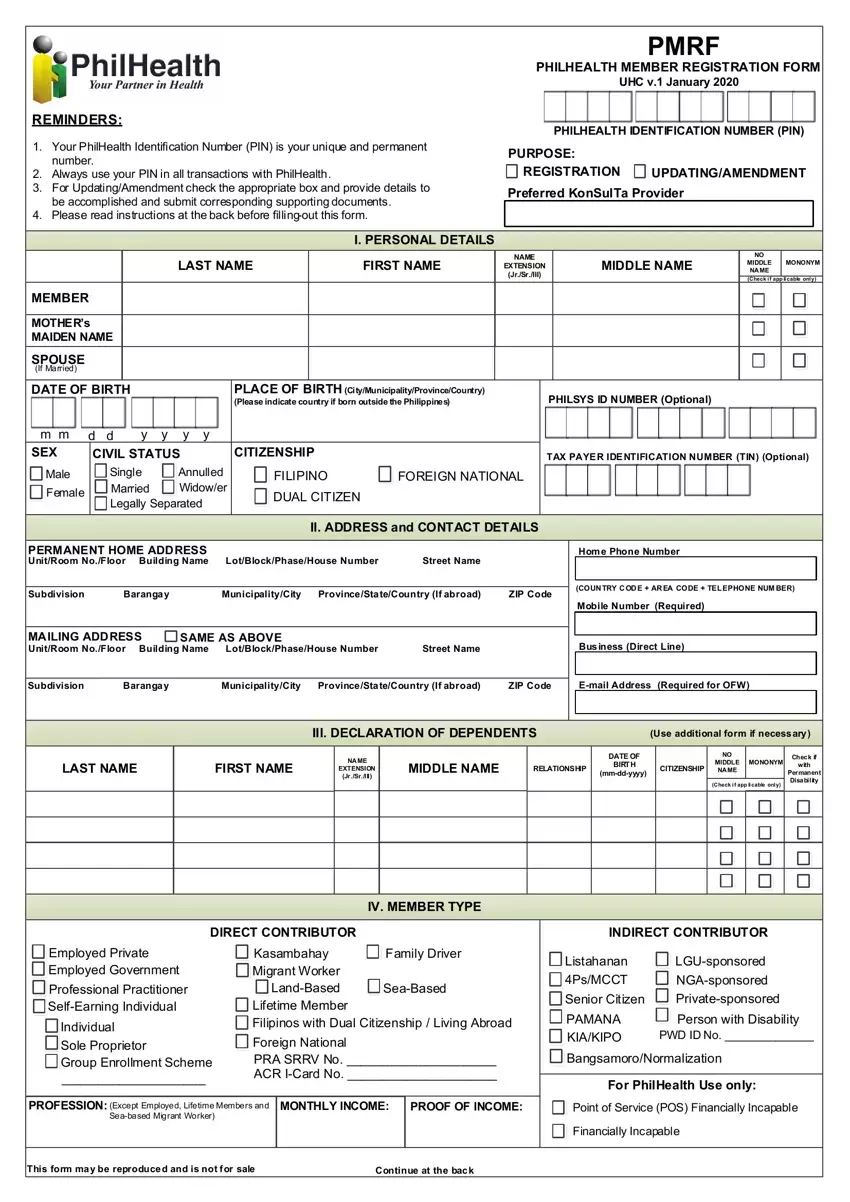
- PhilHealth Member Registration Form (PMRF), when required
- A valid identification document or supporting document, if requested
Some applicants may need additional documents depending on their circumstances. Make sure your name, birth date and other personal details are correct. Use information that matches your official documents to avoid delays.
How to Register for PhilHealth Online in 2027
Follow these general steps to apply for PhilHealth membership online.
Step 1: Visit the Official PhilHealth Website
- Open the official PhilHealth website: https://www.philhealth.gov.ph/
- Look for the Online Services section and select the available registration option.
- Always check that you are visiting the official PhilHealth website before entering your personal information.
Step 2: Open the Membership Registration Service
- Follow the registration link provided through the official PhilHealth website or Member Portal.
- Read the instructions displayed on the registration page before continuing.
- Make sure you select the option for new membership registration if you do not already have a PhilHealth PIN.
Step 3: Enter Your Personal Information
Provide the details requested in the application form.
You may be asked to enter information such as:
- Complete name
- Date of birth
- Sex
- Civil status
- Home address
- Email address
- Mobile number
- Employment or membership category
Check all the details carefully before moving to the next step.
Step 4: Complete the PhilHealth Registration Form
Complete the required membership information and provide the details requested by the system. If PhilHealth asks you to submit the PhilHealth Member Registration Form (PMRF), download the form from the official website, fill it out correctly, and prepare a clear copy. You can find official PhilHealth forms here: https://www.philhealth.gov.ph/downloads/
Step 5: Upload the Required Documents
If the online application asks for supporting documents, upload clear and readable copies.
Make sure that:
- All information is visible.
- The documents are complete.
- Your name matches the application.
- The uploaded files follow the instructions shown on the website.
Do not upload documents to unofficial websites or share your personal information with unknown individuals.
Step 6: Review and Submit Your Application
- Before submitting, check your personal information and uploaded documents.
- If everything is correct, follow the instructions on the official website to submit your application.
- Keep any confirmation message or application reference provided by the system.
Step 7: Check Your Email for Your PhilHealth PIN
After your application has been successfully processed, PhilHealth will send your PhilHealth Identification Number (PIN) to your registered email address.
According to information shared by PhilHealth Region 12 in September 2026, complete online applications may receive their PIN within three to five working days. Processing time can vary, so check your email and spam folder for updates. Keep your PIN safe because you may need it for future PhilHealth transactions.
How to Create a PhilHealth Member Portal Account
If you already have a PhilHealth PIN but have never used the online Member Portal, you may need to create an online account.
Follow these steps:
- Visit the official PhilHealth Member Portal: https://memberinquiry.philhealth.gov.ph/member/
- Select the “Create Account” option.
- Enter your “PhilHealth PIN” and the other requested details.
- Create a secure password.
- Complete the required verification.
- Follow the email activation instructions, if provided.
- Log in using your account details.
After successfully creating your account, you can access the online services available to your membership.
Remember: Do not select new membership registration if you already have a PhilHealth PIN. You may only need to create an online account.
What Can You Do After PhilHealth Registration?
After receiving your PIN and setting up your Member Portal account, you can use the available online services.
Depending on the services available to your account, you may be able to:
- View your membership information.
- Check your posted contributions.
- View or download your Member Data Record (MDR).
- Check your registered dependents.
- Update or amend membership information.
- Access your Statement of Premium Account (SPA).
- Pay eligible premium contributions online.
- Select a YAKAP provider.
Some services may require additional information or steps.
What If You Cannot Register Online?
Sometimes applicants may experience problems while completing online registration.
Here are some common situations and what you can do.
- Registration page is not opening: Check your internet connection and try again later. You can also open the official PhilHealth website and access the registration service through its Online Services section.
- You are not receiving an email: Check your inbox, spam and junk folders. Make sure you entered the correct email address.
- Your personal information is incorrect: Review the information before submitting. If you have already submitted an application with incorrect details, contact PhilHealth for guidance.
- You already have a PhilHealth PIN: You may already be registered. Try accessing the Member Portal account creation option instead of submitting another membership application.
- Online registration is not working: You can visit a PhilHealth Regional Office or Local Health Insurance Office for assistance. Carry your completed PMRF and supporting documents, if applicable.
How to Contact PhilHealth for Registration Assistance
If you have questions about your application, PIN, membership details or registration requirements, contact PhilHealth directly.
- Official Website: https://www.philhealth.gov.ph/
- Member Portal: https://memberinquiry.philhealth.gov.ph/member/
- Email: actioncenter@philhealth.gov.ph
- PhilHealth Action Center: (02) 8662-2588
You can also visit the official PhilHealth website to check the latest contact information and office locations.
Frequently Asked Questions About PhilHealth Online Registration
1. Can I register for PhilHealth online in 2026?
Yes. PhilHealth provides online membership registration through its Member Portal. Applicants should follow the current instructions displayed on the official website.
2. Is PhilHealth online registration free?
The registration application itself is not a paid service on this informational website. However, eligible members may have premium contribution obligations depending on their membership category. Check the official PhilHealth website for current contribution rules.
3. How many days does PhilHealth registration take?
Processing time may vary. PhilHealth Region 12 reported in September 2026 that complete online applications may receive their PIN within three to five working days.
4. How can I get my PhilHealth PIN?
You can apply for membership through the official PhilHealth registration service. After successful processing, your PIN is sent to your registered email address.
5. Can I create a PhilHealth account without a PIN?
The online Member Portal account creation process requires an existing PhilHealth PIN. If you do not have one, complete the new membership registration process first.
6. What is the difference between PhilHealth registration and Member Portal registration?
PhilHealth membership registration is for people who need a PhilHealth PIN. Member Portal account registration is for existing members who already have a PIN and want online access to their membership records.
7. Can I register for PhilHealth without visiting an office?
Yes. Online membership registration is available through the official PhilHealth online services. However, applicants who face difficulties or need additional assistance can visit a PhilHealth office.
8. Where can I download the PhilHealth registration form?
You can download the PhilHealth Member Registration Form (PMRF) from the official PhilHealth Downloads page:
https://www.philhealth.gov.ph/downloads/
Final Words
PhilHealth online registration makes it easier for eligible individuals to apply for membership and access the services offered by the National Health Insurance Program.
Before applying, prepare your personal information, active email address and required documents. Follow the official instructions carefully and check your email for updates about your application. Always use the official PhilHealth website for registration and other membership transactions.